Understanding my bill
The bills we send out have a fair bit of important information on them, while most of it is pretty straightforward; there are some things that may need a little more explanation.
Understand your Synergy bill
Watch our video below to get a better understanding of your Synergy bill. For a detailed summary plus helpful tips to manage your energy usage, look below to see each section of your bill at a glance.
Learn more about what's printed on your bill


What makes up the cost on the bill?
Your bill is made up of various components, such as a supply charge, consumption of electricity, fees, charges, concessions and GST.
Unless you are a self-read customer, Western Power reads your meter or estimates your meter reading at regular intervals and supplies us with the information to produce your bill. Self-read customers read their own meter and provide the data directly to Western Power. Synergy is required to use the data from Western Power when calculating your bill. We calculate your bill by applying your nominated electricity tariff or plan to the data, to obtain what we refer to as ‘billing data’.
On the back of the bill you will find a detailed breakdown of the charges payable and any applicable deductions, as well as the details of your chosen energy plan.
Consumption – This refers to how much electricity you used at the property during the supply period. Consumption is measured in Kilowatt hours (kWh). The amount you pay per 'unit of electricity' or the Unit price is based on your energy plan .
Other charges – You may also receive rebates (credits) or incur other fees and charges depending on your circumstances.

What are my account details?
These are the first few numbers you'll see, located top right of the bill - including your account number, invoice date and account period (the time period your bill covers).
You'll need these details, especially your account number, to help confirm your identity - whenever you need to contact us or when using some of our online services, including registering for My Account.

More help and advice...
I'm moving home, what do I need to do to transfer my connection?
How much do I owe?
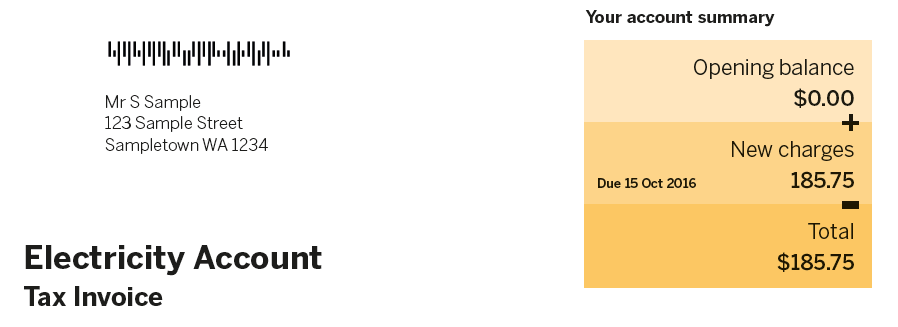
Your account summary lists the total amount outstanding on your account (if any), followed by new charges which are due on the date noted to the left of the charges, and finally, your total amount due.
How much energy have I used?
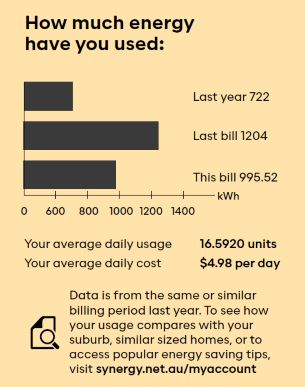
Half way down your bill you'll see this quick summary of the amount of energy you've used, compared to your last bill and finally the year before (if data is available).
You'll find more in depth data like suburb comparisons in My Account, but this is a good way to keep an eye on your usage over the seasons.
More help & advice...
How do I pay my bill?
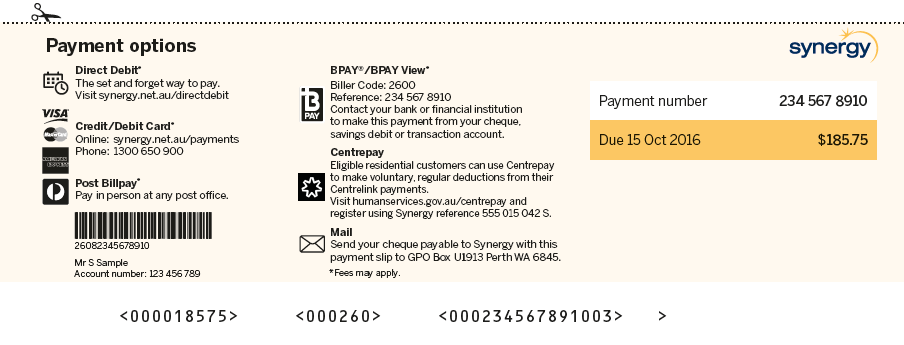
Located at the bottom of the bill you'll find a list of payment options available - including Direct Debit, Credit/Debit Card, BPAY, Centrepay, Mail or at your local post office.
Take note of your payment number as you'll need this to pay your bill online, or via BPAY, where you will also need to state Synergy's biller code (2600).
More help & advice...
Learn more about our bill payment options
Where can I find my meter reading details?
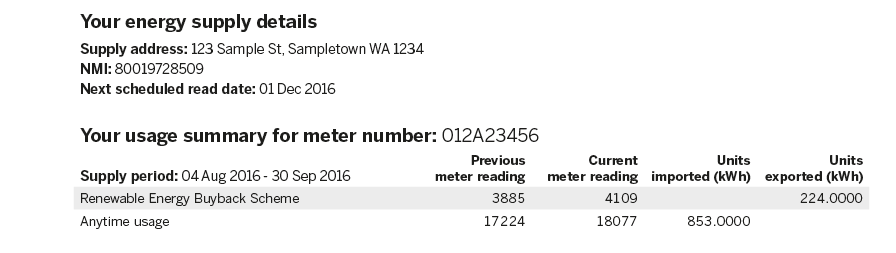
Located on the back of the bill, you'll find your energy supply details, including your supply address, your next scheduled read and your meter number.
It's important to note that Western Power owns and maintains the meter at your home. If you're a self reader, you'll need to ensure you supply a meter reading to Western Power by the next scheduled read date, indicated on your bill.
Your usage summary details the period of which you have been billed for and the amount of units (measured in kWh) consumed during this time. If you have solar panels, the amount of units exported will be displayed next to this amount.
More help & advice...

What are my total charges and deductions?
On the back of the bill, you'll find a detailed break down of your charges and deductions. This includes your chosen energy plan, the amount of units consumed, your Western Power supply charge and any concessions or deductions you may be eligible for.

How can I lower my bill costs?
Heating and cooling your home forms a pretty big part of your overall energy use, so it’s worth looking at ways to optimise your energy efficiency with the following energy saving tips.
More help & advice...
Find out about energy saving tips
Related content
Am I eligible for concessions?